


In South Africa, having a valid ID card is essential for accessing government services, opening a bank account, and even finding employment. If you’ve lost your ID, are applying for your first ID, or simply need to renew or upgrade to a smart ID card, this guide will walk you through the process for 2026.
Why a Smart ID Card matters
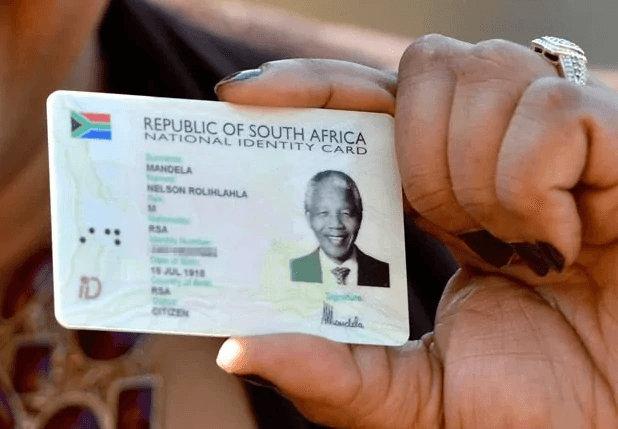
A South African Smart ID card is official proof of identity and citizenship. It is more secure than the old green ID book and forms part of the Department of Home Affairs’ long-term plan to phase out the green bar-coded document.
You will usually need an ID to:
- Interact with many public and private institutions.
- Open a bank account
- Apply for work
- Register for exams
- Access social services
ALSO READ: SASSA Gold Card Replacement Guide
Who can apply for a Smart ID card in 2026?
In 2026, the following groups can apply:
- South African citizens aged 16 and older
- First-time applicants
- People replacing a lost, stolen, or damaged ID
- People upgrading from the green bar-coded ID book
- Qualifying naturalised citizens and lawful permanent residents, who were added to the Smart ID rollout from May 2025 and remain included in 2026.
This is one of the biggest recent changes. Older articles often leave out naturalised citizens and permanent residents, but they are now part of the Smart ID system.
Documents You’ll Need
The documents depend on the type of application.
First-time applicants
You may need:
- A birth certificate
- A certified copy of a parent, legal guardian, or informant’s ID
- A death certificate if parents are deceased
- Proof of residence, where available, or your residential address.
Replacements or upgrades
You may need:
- Your green ID book or damaged Smart ID card
- An affidavit if the ID was lost or stolen
- Proof of residence, where available, or your residential address
- Supporting civil documents where relevant, such as a marriage certificate or divorce order.
Tip: Make certified copies of all original documents to avoid delays during submission.
What does it cost in 2026?
The official fee structure remains:
- First issue of an ID: free
- Re-issue or replacement Smart ID card: R140
- Temporary Identity Certificate (TIC): R70.
If your ID has an error caused by Home Affairs, the replacement can be issued free of charge.
How to apply for a Smart ID card in 2026
In 2026, there are now three main ways to apply.
1. Apply online through eHomeAffairs
The eHomeAffairs platform still allows you to:
- Create a profile
- Complete your application
- Upload supporting documents
- Make payment
- Schedule an appointment at participating bank branches.
This is still one of the easiest ways to begin the process.
2. Apply at a Home Affairs office
You can still apply directly at a Department of Home Affairs office. Government information also notes that some offices use an online booking system, so it helps to check whether your chosen branch requires a booking before you go.
3. Apply at participating bank branches
This is the biggest 2026 update.
Home Affairs launched a new digital partnership model with banks. At the first live branches, eligible clients can complete a Smart ID application in five to ten minutes, and the department said these branches do not require advance booking under the new model. The rollout is happening in phases and will expand further through 2026.
This means your article should no longer present bank applications only as the older appointment-based option. In 2026, there are now two realities:
- The older eHomeAffairs bank-branch booking model still exists in some places, and
- The new digital walk-in bank model has started at selected branches and is expanding.
What happens during the application?
Whether you apply online, at Home Affairs, or through a participating bank, you will still need biometric capture. This includes:
- Fingerprints
- A photograph
- Your signature.
You generally do not need to bring printed ID photos for a Smart ID card application, because the image is captured digitally at the office or branch. Printed photos are typically only relevant for a Temporary Identity Certificate.
Biometric Data Capture
Whether you apply online or walk in, capturing your biometric data (fingerprints, photo, and signature) is mandatory. This step ensures that your ID card is uniquely linked to you.
If you choose the online route, biometric data capture will occur at the Home Affairs office or a supported bank branch (e.g., Standard Bank, FNB, or Nedbank).
Tracking Your Application
After submitting your application, you can track its progress:
- Via SMS: Register for SMS updates during your application.
- Online Tracking: Log into your eHomeAffairs account.
- Phone: Call the Home Affairs Contact Centre at 0800 60 11 90.
Most applications are processed within 14 working days, but delays can occur during peak periods.
Collecting Your Smart ID Card
Once your ID is ready for collection, you’ll receive a notification via SMS or email. Here’s what to do:
- Visit the office where you submitted your biometric data.
- Bring along your receipt and an existing form of identification.
- Verify your fingerprints upon collection.
Note: Only the applicant can collect the ID card; no proxies are allowed.
Tips for a Smooth Application Process
- Arrive Early: Whether applying in person or collecting your ID, avoid long queues by arriving early.
- Check Office Hours: Confirm operating hours for your chosen branch on the Home Affairs website.
- Double-Check Documents: Incomplete documents can delay your application.
- Avoid Peak Times: Avoid visiting Home Affairs at the end of the month or during school holidays when it’s busiest.
Frequently Asked Questions
What if I lose my Smart ID card?
You can apply for a replacement. If it was lost or stolen, you will usually need an affidavit. The replacement fee is R140.
Can I apply on behalf of someone else?
No. The applicant must appear in person for biometric capture.
Can naturalised citizens and permanent residents apply in 2026?
Yes. This became possible from 12 May 2025, and it remains relevant in 2026.
Is the old green ID book still valid?
While it’s still valid for now, it’s advisable to upgrade to the Smart ID card for enhanced security and convenience.
Special Considerations for Remote Areas
For residents in rural or remote areas, mobile units occasionally visit communities to facilitate applications. Check with your local municipal office or Home Affairs branch for schedules.
Also read: How to Upgrade to the New Black SASSA Card in 2025
Applying for a new ID card in 2025 is straightforward, thanks to online services and efficient in-person options. By following the steps outlined in this guide, you can ensure a hassle-free application process. Remember to keep your documents ready, pay attention to deadlines, and track your application to avoid unnecessary delays. A Smart ID card is your key to accessing numerous services and opportunities in South Africa—don’t wait to apply!