





Tshwane North TVET College Application Statuses can feel confusing at first. However, each status tells you what the college needs next. It also shows where your application sits in the selection process. Tshwane North TVET College publishes these status meanings on its official website.
This guide breaks down the codes in plain language. It also shows what you should do after each update.
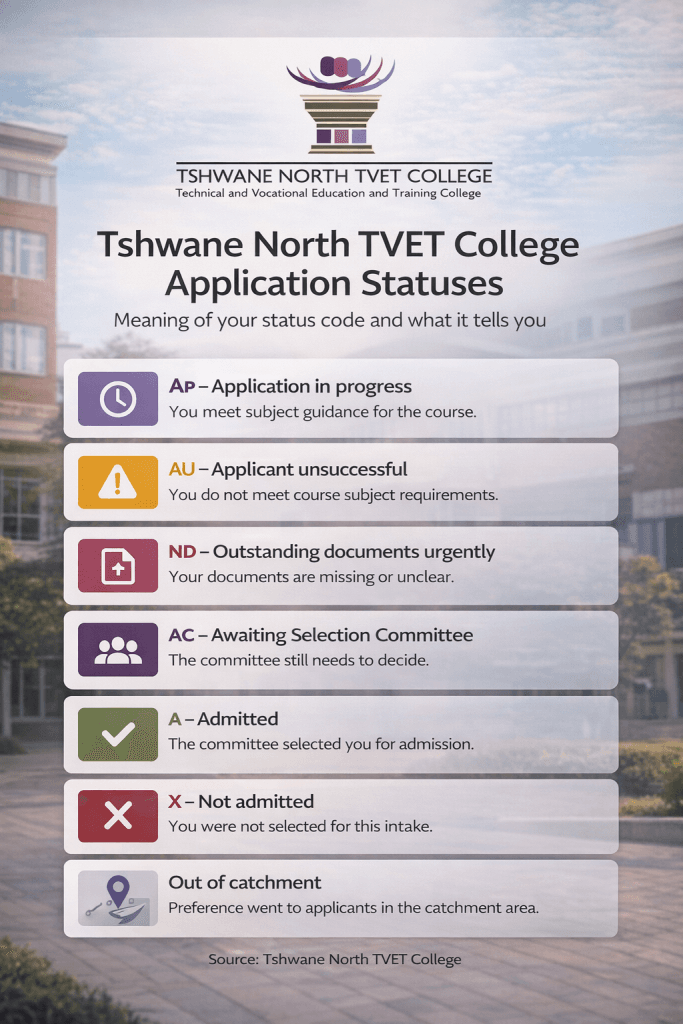
Tshwane North TVET College Application Statuses and what they mean
Tshwane North TVET College groups statuses into two stages. First, the college receives your application. Next, the selection committee finalises decisions.
ALSO READ: Sedibeng TVET College Application Status Check: A 2026 Guide
Step 1: “Applications received” statuses
Applicant without status
You submitted your application. However, the system has not updated yet.
What to do: Wait for the automated “application received” message.
AP – Application in progress
Tshwane North TVET College indicates you have course-specific, recommended subjects.
What to do: Keep checking your portal for committee movement.
AU – Applicant unsuccessful
Tshwane North TVET College uses this when you lack course-specific subjects.
What to do: Apply for a closer-fit programme. Also, review entry subjects.
ND – Outstanding documents urgently
Tshwane North TVET College could not see your documents clearly. Or you did not attach them.
What to do: Re-upload clean PDFs. Use clear scans and readable photos.
AC – Awaiting Selection Committee
Your application went to the selection committee.
What to do: Monitor email and SMS updates. Also, keep your phone active.
A – Admitted
The committee selected you for registration or admission.
What to do: Prepare for registration steps. Watch for official instructions by SMS or email.
X – Not admitted
Tshwane North TVET College did not select you. This can happen due to a score or high demand.
What to do: Apply in the next round. Also consider another campus or programme.
Out of catchment
Tshwane North TVET College gives preference to applicants within its catchment area.
What to do: Apply early next round. Also consider colleges closer to your address.
Step 2: “Selection done by the committee” outcomes
Once the committee completes the selection, the college uses plain outcomes:
- Application successful: You were selected.
- X Not admitted / Applicant unsuccessful: You were not selected.
Tshwane North TVET College also lists common reasons for unsuccessful outcomes:
- NS Capacity restrictions: You qualified, but space ran out.
- ND Outstanding documents: You did not upload or email documents.
- AU Application unsuccessful: You miss minimum admission requirements.
ALSO READ: Status Check Help Hub: All Official Links in One Place
How to check your status the right way
Tshwane North TVET College advises applicants to track progress on the student portal.
Also, the college sends outcomes via SMS or email after the closing dates.
Do this each time you log in:
- Check your email inbox and spam folder.
- Confirm your cellphone number still works.
- Save your username and password securely.
- Keep PDFs ready: ID, results, and proof of residence.
Short case study: ND to AC in two days
Lerato applies for an Engineering programme. She uploads photos of her results.
Her status changes to ND because the images look blurred.
She rescans her documents using a phone scanner app. She uploads clean PDFs.
Two days later, her status moves to AC. That shows the committee can review her file.
Lesson: Clear documents speed up decisions. They also reduce delays.
FAQs
What does AP mean at Tshwane North TVET College?
AP means “Application in progress”. It suggests you have recommended subjects for the course.
Why do I see “Out of catchment”?
TNC may prioritise applicants in the catchment area for that round.
Where can I confirm official TVET guidance?
Use the Department of Higher Education and Training TVET pages for official oversight.
Tshwane North TVET College status codes help you act early and avoid missed deadlines. Check your portal often. Keep your documents clear. Also, respond quickly to college messages.