




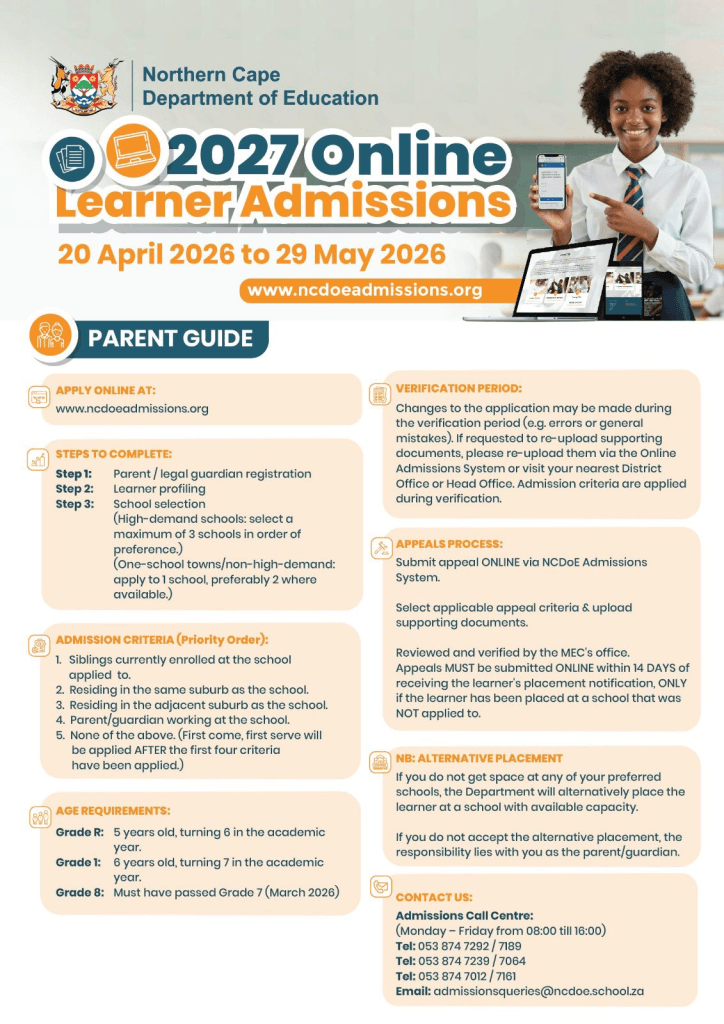
The Northern Cape Department of Education has officially opened the 2027 online admissions process, and parents are urged to apply early to secure placement. The application window runs from 20 April 2026 at 09:00 until 29 May 2026 at 23:59, giving families limited time to complete their applications.
This guide explains everything you need to know about Northern Cape school admissions 2027, including how to apply, required documents, and where to get help if you do not have internet access.

When to Apply for Northern Cape School Admissions 2027
The NCDoE online admissions 2027 process is strictly time-bound:
- Opening date: 20 April 2026 at 09:00
- Closing date: 29 May 2026 at 23:59
Applications submitted after the deadline may not be considered during the main placement process. Schools prioritise on-time applications, so early submission is critical.
ALSO READ: Top 10 Free Online Courses to Boost Your Skills in 2026
Who Must Apply Online?
The Northern Cape Department of Education requires online applications for the following grades:
- Grade R
- Grade 1
- Grade 8
Parents must apply through the official portal:
www.ncdoeadmissions.org
How the Northern Cape Online Admissions System Works
The Northern Cape Department of Education admissions system follows a simple three-step process:
Step 1: Parent/Guardian Registration
Create an account on the admissions portal. You will receive login details via SMS.
Step 2: Learner Profiling
Capture your child’s personal and school details accurately.
Step 3: Application Submission
Select your preferred schools and submit the application.
- You can choose up to 3 schools (especially in high-demand areas)
- In smaller towns, applying to at least 1–2 schools is recommended
All three steps must be completed for the application to be valid.
Documents Required for NCDoE Online Admissions 2027
Parents must upload supporting documents within 7 days of submitting the application.
Prepare the following:
- Parent/guardian ID (or sworn affidavit if unavailable)
- Proof of home address
- Municipal account
- Lease agreement
- Proof of residence (including informal settlements)
- Learner’s birth certificate (or affidavit/sworn statement)
- Clinic card/proof of immunisation (Grade R and Grade 1)
- Latest school report (Grade 7 learners applying for Grade 8)
Ensure all documents are clear and correctly uploaded to avoid delays.
How School Placement Is Decided
Applications are processed using a priority system, not purely first come, first served.
Placement is prioritised as follows:
- Learners with siblings already at the school
- Learners living in the same suburb
- Learners in adjacent suburbs
- Learners whose parent works at the school
- Remaining applicants (processed after priority groups)
If space is still available, applications are then considered in order of submission.
Walk-In Centres for Parents Without Internet Access
The Northern Cape Department of Education provides walk-in centres in all districts.
Parents can visit these centres to:
- Register on the system
- Complete applications
- Upload documents
- Receive assistance from officials
This ensures that parents without internet access can still complete the school applications Northern Cape 2027 process.
Verification, Appeals and Placement Process
Verification Period
Parents can correct errors or upload missing documents during the verification phase. Schools will review all submitted information before final placement.
Appeals Process
If your child is placed at a school you did not choose, you can:
- Submit an appeal online via the admissions system
- Upload supporting documents
- Submit the appeal within 14 days of receiving placement
All appeals are reviewed by the department.
Alternative Placement
If no space is available at your selected schools:
- The department will assign your child to a school with available space
- If you decline this placement, you will need to find a school independently
How to Track Your Application Status
Parents will receive:
- SMS notifications with updates
- Placement results once finalised
You can also log in to the admissions portal to check your application status at any time.
Frequently Asked Questions (FAQs)
How do I apply for Northern Cape school admissions 2027?
Apply online at www.ncdoeadmissions.org by registering, capturing learner details, and selecting schools.
How many schools can I apply to?
You can apply to up to three schools, depending on availability in your area.
When must documents be submitted?
All required documents must be uploaded within 7 days of applying.
What if my child is not placed in any selected school?
The department will provide an alternative placement where space is available.
Important Tips for a Successful Application
- Apply as early as possible
- Upload documents within 7 days
- Double-check all information
- Select multiple schools where possible
- Keep your reference number safe
These steps will improve your chances of securing placement.
Contact Details and Support Channels
For assistance, contact the Northern Cape Department of Education:
- Call Centre:
- 053 874 7189 / 7161
- 053 874 7012 / 7064
- 053 874 7239 / 7292
- Email: admissionsqueries@ncdoe.school.za
Support is also available at district walk-in centres.
Why Early Application Matters
The Northern Cape Department of Education handles thousands of applications each year, and school spaces are limited.
Applying early ensures:
- Inclusion in the main placement process
- Time to fix errors
- Better school options
Late applications significantly reduce placement chances
The Northern Cape Department of Education 2027 online admissions process is structured and accessible when followed correctly. By applying early, preparing documents, and using available support services, parents can avoid delays and secure placement.
Use the official portal, follow the steps carefully, and seek help if needed. This will ensure a smooth and successful NCDoE online admissions 2027 experience.